01 / CAPABILITY
Client and matter site tree
Matter sites group under client nodes with configurable library visibility, plus favorites and recents that roam across hosts and devices.
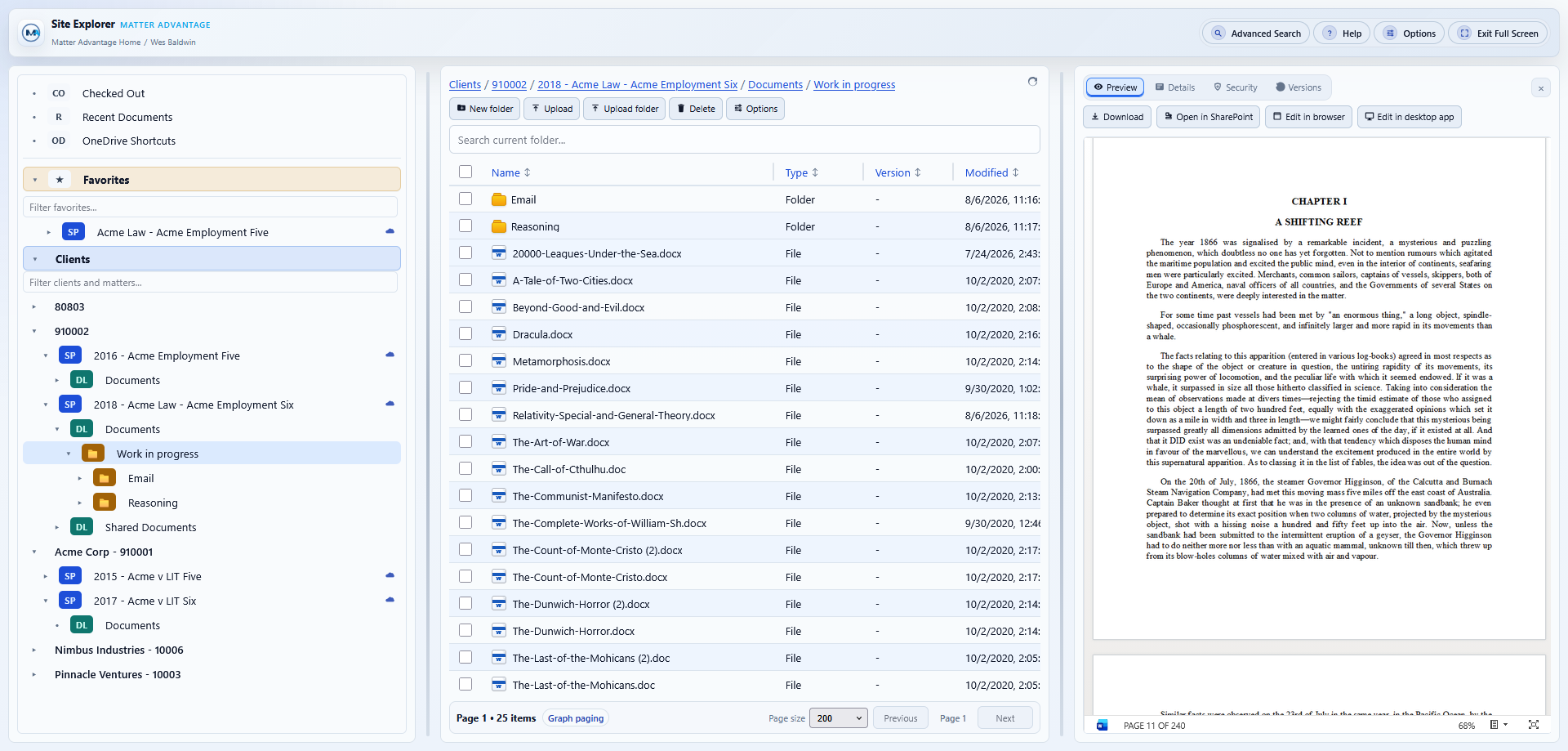
Site Explorer is a familiar three-pane document explorer for firms running on SharePoint, available inside SharePoint, Teams, and Outlook.
When every client matter is its own site, routine document tasks turn into navigation. Users open a separate browser page for each matter, hunt for the right library, and lose the client and matter context the firm actually organizes work around.
Version history, permissions, and file details each sit behind their own screen. Emails saved to the DMS give no indication of what is attached without downloading them first. Connecting a matter library to the desktop means visiting each site individually and clicking through sync options. None of this is broken, but it costs minutes on every interaction, and those minutes multiply across every timekeeper, every day.
Site Explorer runs inside SharePoint, Teams, and Outlook, so there is nothing to install and nothing new to learn. A single navigation tree spans every matter site the user can access, grouped by client and matter rather than by site URL, with a file grid in the center and preview, details, security, and version history always one click away in the right pane.
Browsing across matters no longer requires a new page per site. Search works at folder, site, or cross-site scope from the same place, and every result carries its site and folder context. Version history, checkout, permissions, and preview are reachable without leaving the current folder. Emails saved to the DMS open right in the preview pane, complete with headers, formatting, and a full list of their attachments, without downloading a copy or switching to Outlook. Documents open straight into desktop Word or the browser editor.
Linking a matter library to the desktop is a single right-click. Add OneDrive shortcut puts the library in File Explorer on Windows and Finder on Mac, synced and ready, with no per-site sync setup, and a client-level action can link an entire client’s matters in one operation. Everyday tasks that take five or six clicks in native SharePoint typically take one or two here, and the app runs on the signed-in Microsoft 365 session and the user’s existing SharePoint permissions, so the efficiency gain never comes at the cost of access control.
Matter sites group under client nodes with configurable library visibility, plus favorites and recents that roam across hosts and devices.
Filter the current folder, search recursively within a single site, or search across every accessible site, with site and folder context on every result.
Preview, details, security, and version history for the selected file without leaving the folder.
Double-click opens supported Office files in the installed desktop application, with Edit in browser, Open in SharePoint, and Download always available.
Check out, check in, discard, publish, restore, delete, upload a new version, or copy the current version, plus tracked Checked Out views per site and across sites.
MSG and EML files render inline with sender, date, recipient, and subject headers, while the Attachments tab lists every attachment for opening or download in place.
Add or remove shortcuts for a single site, in bulk for all of a client’s matters, or automatically when a site is favorited.
Drag and drop files or entire folder trees with automatic folder merge, per-file duplicate handling, and cancellable batch queues.
Break or reset inheritance, grant or revoke access, review sharing links, and copy deep links to any site, library, folder, or file.
Deliver one experience in a SharePoint page, full-page app, Teams tab, or Outlook, with single-site and multi-site reports and client-matter CSV export.